Icon of program: UnHackMe

UnHackMe for Windows

  • Trial version
  • 3.7
    85
  • 63K
  • V18.57.2026.730
Download for Windows

View an ad to download for free

An Anti-Rootkit Software that Thwarts Different Malicious Software

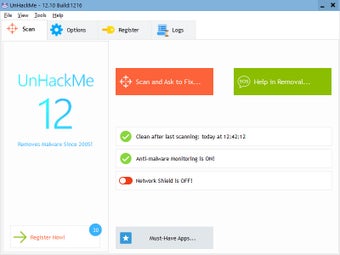
Having started its journey as an anti-rootkit application, UnHackMe is a software tool that helps you get rid of various malicious software from your computer.

Top Recommended Alternative

Tackles Malicious Software

UnHackMe eliminates different malicious software, including Trojans, spyware, keyloggers, etc. The service should help you tackle search redirects, popup adverts, unwanted processes running in the background, slow browsing, and PUPs (potentially unwanted programs). To use this malware-removing tool, you need not uninstall or disable your existing antivirus software. UnHackMe is technically not an antivirus software. But it takes a different route that most antivirus software do not. For instance, it looks for junk files made by adware and spyware, tests Windows shortcuts, scans for rootkits, examines browser search settings and add-ons, tests DNS settings and host files, etc. UnHackMe is technically not an antivirus software. But it takes a different route that most antivirus software do not. For instance, it looks for junk files made by adware and spyware, tests Windows shortcuts, scans for rootkits, examines browser search settings and add-ons, tests DNS settings and host files, etc.

Work Modes

UnHackMe works in three different modes: normal Windows mode, offline scanning and remote checking. In the regular Windows mode, the software gets rid of unwanted programs by cleaning a browser, deleting Trojans, spyware and adware. Offline scanning works from USB/CD booting. This double-checking ensures suspicious codes are dealt with before they could enter the system. At this stage, locating and eliminating inactive malicious software is good. Also, it becomes easy to locate kernel rootkits that hide files and also boot-record rootkits and registry. Remote checking entails log file usage. With the log file, you can check problems there are with remote systems. Once the file is checked, a solution file is sent to the remote computer.


  • Pros

    • A holistic anti-malware solution
    • Works in tandem with other antivirus software
  • Cons

    • IT newbies may find it overwhelming
    • Interface not necessarily intuitive
 0/4

App specs

Program available in other languages


Icon of program: UnHackMe

UnHackMe for PC

  • Trial version
  • 3.7
    85
  • 63K
  • V18.57.2026.730
Download for PC

View an ad to download for free


User reviews about UnHackMe

3.7

4 reviews

Add review

Main reviews for you

  • Anonymous user

    After nearly two days of trying to get rid of browser hijacker malware (twisting the start page of all browsers) and testing lots of tools, UnHackMe was the only software that managed not only to detect the malware but also to remove it. Great. Thanks!

  • Anonymous user

    Great job. . It was the only software I could get rid of Torrentex.ru and Get.search trojans with.Others, like Malwarebytes, Avira, adwcleaner didn't do the job. Pros: effective Cons: menue a bit irritating

  • Anonymous user

    The program worked well for me to remove malware.. I love this program and their support team is friendly and efficient when you need help. Pros: Friendly and efficient support when you need it.Removes malware 5 different ways. Cons: Sometimes hard to figure out which option to use to proceed with malware removal.

  • Anonymous user

    It really works. its a really must have software. amazing. in just one scan. my pc back in its normal functions. like a new one.. thanks alot.

More

You may also like

Alternatives to UnHackMe

Explore Apps

Latest articles

Laws concerning the use of this software vary from country to country. We do not encourage or condone the use of this program if it is in violation of these laws.
Softonic

Is UnHackMe safe?

100/100

Score result: Clean

This file passed a comprehensive security scan using VirusTotal technology. It is safe to download.

  • Virus free
  • Spyware free
  • Malware free
  • Verified by Security Partners

    VirusTotal logo

Scan Info

Last scan
Monday, August 3, 2026
Scan provider
VirusTotal · Full report

File Integrity

File
UnHackMe_V18.57.2026.730.zip
SHA256
26aec1d98aab556f2b32cbccccd62f2d6aeb74e13c085d1ffb7b8abd69af5757
SHA1
06370d962a823833224f1e5e68a14baaac6c0a85

Softonic security commitment

UnHackMe has been thoroughly scanned by our advanced security systems and verified by industry-leading partners. This file comes from the official developer and has passed all our security checks, showing no signs of viruses, malware, or spyware. For more information, visit our Security and Trust Center

Signed in to Softonic as